
A your-turn alert lets you walk away from a long Claude Code run. When the turn ends and the next action is genuinely yours, Agent Island raises one alert that names the session and takes you straight back to it. This guide covers install, the three settings that matter, and how to tell a real handoff from a false one.
Before you start
- Claude Code installed and run at least once on this machine
- Permission to install software (Homebrew on macOS, WinGet on Windows)
- About five minutes, including one test run
1. Install Agent Island
Pick the channel you already use. Package managers can lag a release behind, so compare against the latest GitHub release if you need a specific version.
macOS — Homebrew:
brew install tristan666666/tap/agentislandWindows — WinGet:
winget install TristanTang.AgentIslandOr download the DMG (macOS 13+, universal) or the x64 ZIP (Windows 10/11) straight from the release page.
2. Allow notifications once
On first launch macOS asks for notification permission. Agent Island requests alert permission only — no badges, no sound entitlement, nothing else.
If you dismissed the prompt: System Settings → Notifications → Agent Island → Allow Notifications. On Windows: Settings → System → Notifications, then make sure Agent Island is on.
3. Check the three settings that decide alert behaviour
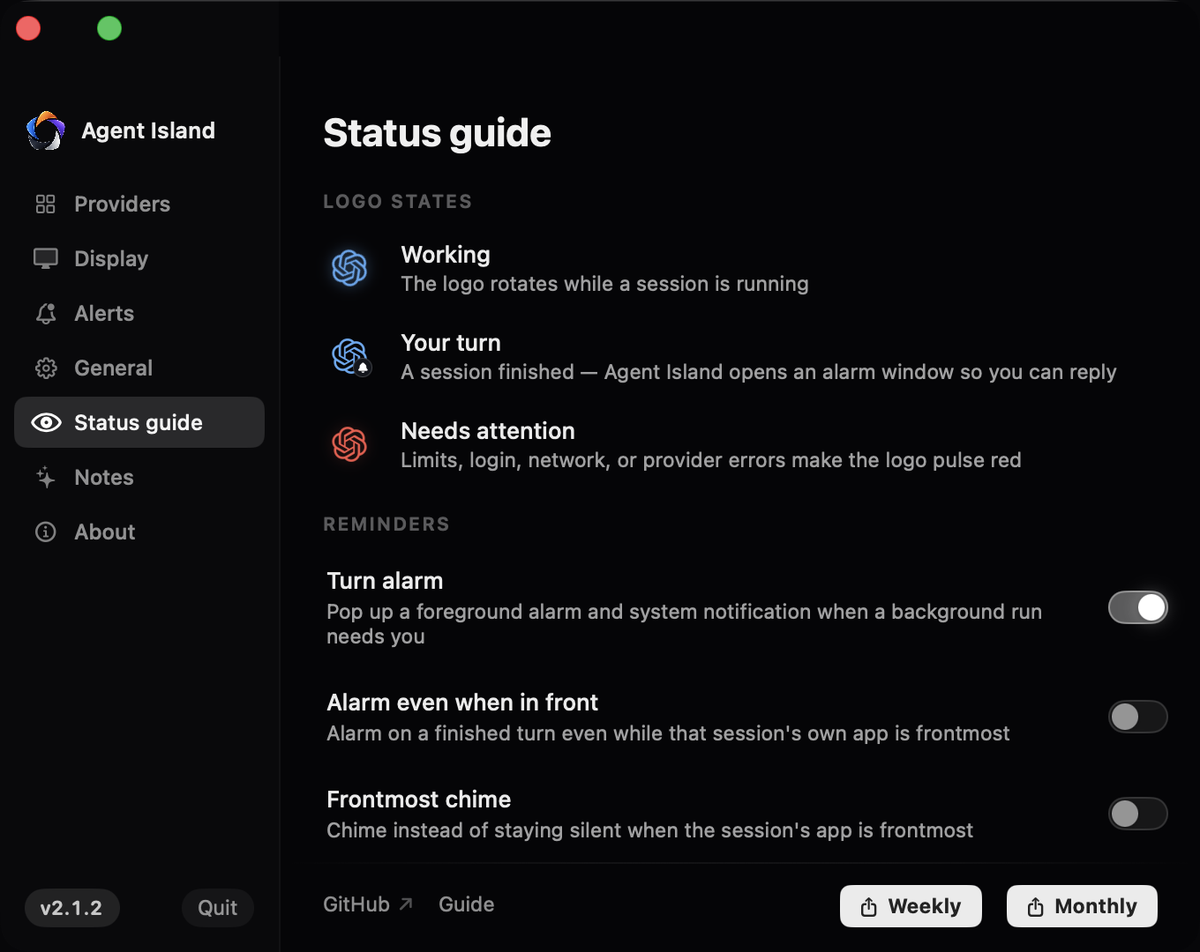
Open Settings from the island menu and go to Status guide. Under Reminders you get:
- Turn alarm — the master switch for your-turn alerts. On by default
- Show thread details — when on, the alert carries the session and project name; when off it only says a background coding session finished a turn. Turn it off on a shared screen
- Alarm sound — switch the tone on, then expand the picker to choose a built-in sound or your own file
4. Run Claude Code the way you already do
No hooks, no wrapper, no flags. Agent Island reads the session records Claude Code already writes to ~/.claude/projects, plus Claude Desktop's session metadata when you use the app. Sessions appear on their own once they have written a meaningful event.

5. Walk away and let the alert do the watching
When the turn ends and the evidence says the next action is yours, you get a foreground alarm window plus a system banner. Two behaviours are deliberate and worth knowing:
- If you were already looking at that session and replied before the alert would fire, it stays silent instead of nagging
- Background and subagent activity that finishes on its own does not create a handoff, so it does not alert
6. Return with Open thread
Click Open thread on the alarm to jump back to the exact session that finished — the session, not just the app. A Claude Desktop session restores the app window; a CLI session returns you to its working-directory context.
7. Understand what the alert does and does not claim
The alert reports a local handoff: Claude ended a turn and current evidence says a reply is needed. It does not certify that the work is correct, and it never resumes or re-prompts the session for you. Visibility and execution authority stay separate on purpose.
If it does not work
Check notification permission first, then Turn alarm in Settings → Status guide. If both are fine, confirm the session is recent — a session idle past the attention window is treated as finished and stops alerting.
A tool step inside a turn can look like an ending. If you hit this reliably, open an issue with the session timestamp; turn detection is tuned against real traces rather than keywords.
Replayed session records can look like new events. Restart the app to rebuild the index; if it comes back, note whether the session was resumed from an archive.
Concurrent sessions are ranked by recency. Trust the label on the alert rather than the order you started them in — and give your working directories distinct names.
The session's launch target may no longer exist, for example a terminal that has since closed. The session row stays accurate; the jump-back needs a live surface to return to.
For the state model behind the alert, read the Claude Code status monitor reference. For the Codex equivalent, see get notified when Codex finishes.
← All guides