

When a session is missing from the island, the cause is nearly always upstream: the coding tool has not written local evidence yet, it wrote it under a different home directory, or macOS is blocking the read. Agent Island never asks a provider what you are running — it reads the records your tools already write, so that is where to look.
Before you start
- The coding tool has been launched at least once under the same user account
1. Confirm the tool wrote something at all
Check the roots directly before touching any setting. If these directories are empty, no monitor could see the session either.
ls -lt ~/.claude/projects ~/.codex/sessions ~/.grok/sessions 2>/dev/null | head -202. Match the root to your provider
Each tool writes somewhere specific:
- Claude Code —
~/.claude/projects, one folder per project - Claude Desktop — session metadata under
~/Library/Application Support/Claude/claude-code-sessions - Codex —
~/.codex/sessions, indexed by~/.codex/session_index.jsonl - Grok —
~/.grok/sessions - Antigravity — its CLI data directory under
~/.gemini - Cursor — its local store under
~/Library/Application Support/Cursor; since 2.1.2 it carries live session state and your-turn alarms too
A custom HOME, a second user account, or a container will move these — and the app only reads the home directory it is running under.
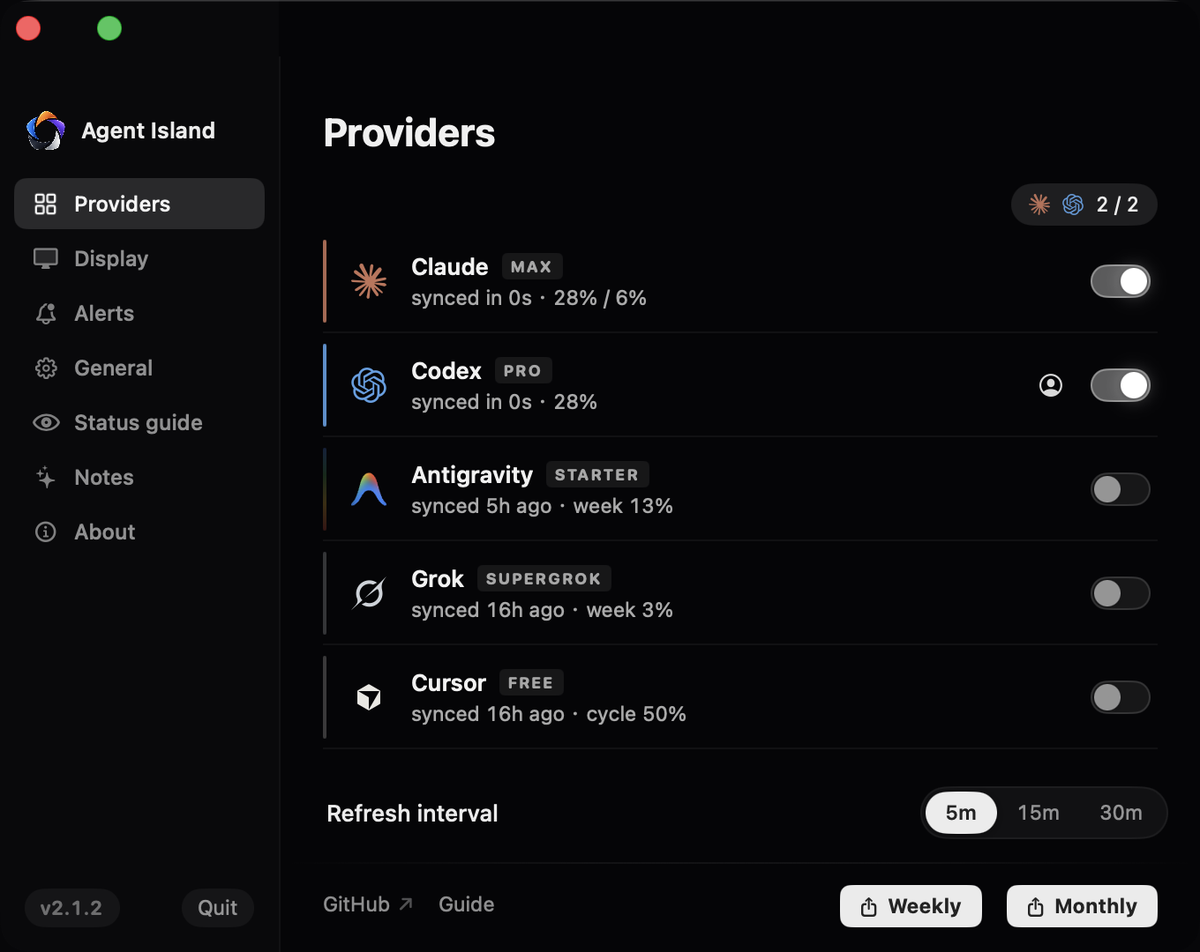
3. Check the provider is enabled in the app
Open Settings → Providers. A provider you hid earlier stays hidden until you re-enable it, and a provider with no detected local sign-in gets no slot and no row at all.
4. Grant file access on macOS
If the roots exist and contain recent files but the app still shows nothing, macOS privacy protection is the usual culprit. Add Agent Island under System Settings → Privacy & Security → Files and Folders, or grant Full Disk Access if the folders sit outside the standard locations.
Quick discriminator: if your shell can ls the directory but the app sees nothing, it is permissions, not paths.
5. Give a new session a moment, and expect old ones to retire
A brand-new session becomes visible once it has written its first meaningful event — usually seconds. Old sessions expire on purpose: past the attention window they are treated as idle rather than shown as permanently active. A session that vanishes after a long pause has not been lost; it has been retired.
6. Use restart as a diagnostic, not a repair
Restarting rebuilds the index. If a session only ever appears after a restart, that is a bug worth reporting rather than a workflow. Note the provider, the session start time, and whether the coding tool was launched before or after Agent Island.
If it does not work
Check that provider's root and its entry in Settings → Providers. A tool that was never signed in writes nothing.
The attention window expiring, by design. Idle sessions retire instead of being shown as active forever.
Almost always file access. Verify with ls in a terminal first — shell can read but app cannot means it is the privacy setting.
State is derived from the newest meaningful event, not from a process check. A session that ended with a provider error is not the same as one waiting for you.
Desktop sessions need their metadata directory too. Confirm ~/Library/Application Support/Claude/claude-code-sessions exists and has recent files.
For how state is derived from those records, read the Claude Code status monitor reference.
← All guides